
Advanced AI Invitation Maker Techniques: Creating Stunning Designs
Creating a beautiful invitation used to require hours of work or expensive design software. Today, artificial intelligence has changed the game. Many people try using an AI tool but feel disappointed when the result looks generic or "too digital." If you have ever wondered why some AI-generated designs look professional while others look messy, the secret is in the prompt. How do you write a prompt that gives you exactly what you want?
In this guide, we will move beyond basic descriptions. We will show you how to communicate with our invitation maker to create high-end, custom results. Whether you are a busy parent planning a birthday or a corporate assistant organizing a gala, these advanced techniques will help you master the art of prompt engineering.
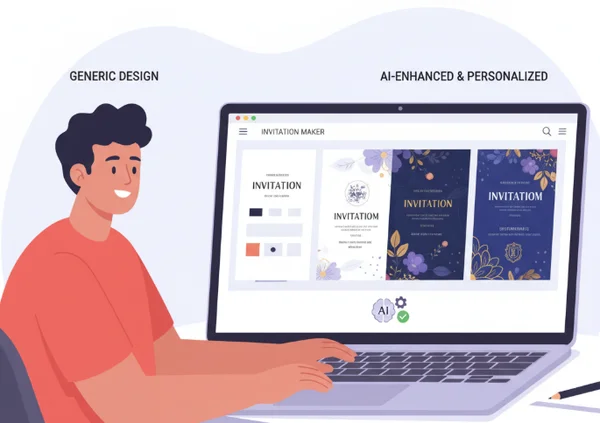
Mastering AI Invitation Prompts: The Foundation
Before we dive into specific formulas, we need to understand the basics of AI communication. A prompt is more than just a sentence; it is a set of instructions. When you use our AI design tool, the system looks for keywords that define the structure, style, and mood of your card.
How AI Interprets Your Prompts
An AI does not "see" the world like humans do. Instead, it breaks your words into small pieces called tokens. It assigns weight to these tokens based on their position and clarity. If you write "a birthday party with balloons," the AI knows the topic is a birthday. However, if you write "a vintage 1920s Gatsby-style birthday party with gold balloons and black velvet textures," the AI has a much clearer blueprint.
The first few words of your prompt usually carry the most weight. If you want a specific style, mention it early. For example, starting with "Watercolor style" will produce a very different result than ending the prompt with "in a watercolor style." Understanding this hierarchy allows you to guide the online tool toward more accurate designs on the first try.
Key Elements of Effective Prompts
To get the best results, every advanced prompt should include five essential elements. Think of these as the building blocks for your invitation:
-
The Core Subject: What is the event? (e.g., Wedding, Graduation, Baby Shower).
-
The Artistic Style: How should it look? (e.g., Minimalist, Art Deco, Boho, Oil Painting).
-
Color Palette: What are the main colors? (e.g., Sage green and cream, Navy blue and silver).
-
Specific Elements: What objects should be present? (e.g., Eucalyptus leaves, Geometric borders, Champagne glasses).
-
The Mood/Vibe: What is the feeling? (e.g., Whimsical, Professional, Dark and Moody, Elegant).
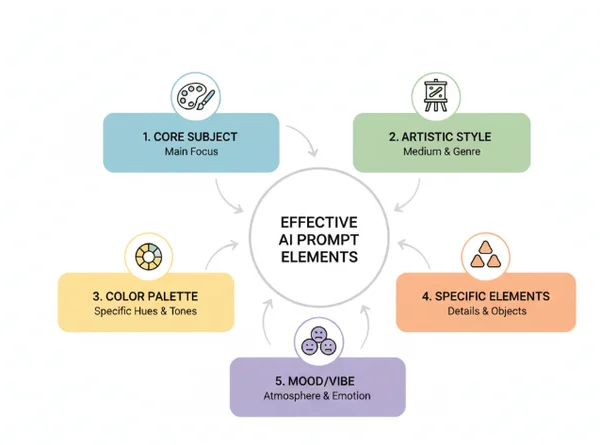
By combining these five parts, you transform a weak prompt into a powerful instruction. Instead of saying "make a party invite," you might say, "Bohemian garden party invitation with dried flowers, muted terracotta colors, elegant serif font, and a warm sunset vibe."
Advanced Prompt Techniques for Specific Invitation Types
Different events require different "languages." A wedding invitation needs a delicate touch, while a corporate event needs to feel trustworthy and organized. Using our free service allows you to experiment with these specialized vocabularies.
Wedding Invitation Prompts That Create Emotional Impact
Weddings are deeply personal. To create a design that feels "expensive" and unique, you must use descriptive adjectives that imply texture and lighting. Avoid generic words like "pretty" or "nice." Instead, use words that professional designers use.
For a classic, high-end look, try prompts that mention materials. Words like "letterpress texture," "vellum overlay," or "gold foil accents" tell the AI to simulate luxury printing methods. If you want a nature-themed wedding, be specific about the plants. Don't just say "flowers"; say "white peonies and eucalyptus" or "wildflowers in a meadow."
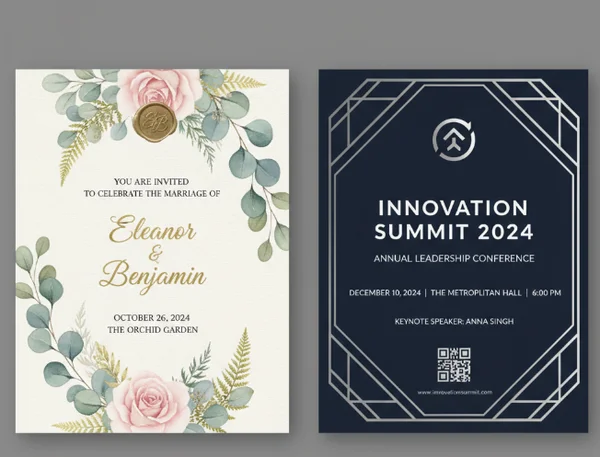
Example prompt: "Elegant wedding invitation featuring a soft watercolor wash in dusty rose and gold. Minimalist layout with plenty of white space. Delicate botanical illustrations of peonies around the border. Fine art aesthetic, high-end stationery feel."
Corporate Event Prompts for Professional Results
For corporate planners, the goal is clarity and brand alignment. You want the invitation to look "slick" and "modern." When designing for a business audience, focus on geometry and layout style. Words like "Swiss design," "Grid-based," "Architectural," and "Sleek" work very well.
If your company has specific brand colors, name them clearly in the prompt. You can also define the "level" of the event. A "Tech Conference" should look different from a "Client Appreciation Gala." For a tech event, use words like "Digital gradients" or "Neon accents." For a gala, use "Midnight navy," "Silver embossing," and "Formal typography." You can create invitations that look like they were made by a marketing agency simply by using these industry-standard terms.
Maximizing AI Invitation Maker Capabilities
Our platform is designed to be intuitive, but "pro" users know how to push the boundaries of the system. The secret to a perfect design is rarely found in the first click. It is found in the process of refinement and layering.
Iterative Refinement: From First Draft to Perfect Design
Even experienced prompt engineers rarely achieve perfection on their first try. The first attempt usually provides a good starting point. The AI provides four different variations to give you a range of ideas. Look closely at these variations. What do you like? What is missing?
If the colors are perfect but the layout is too crowded, don't start over. Take your original prompt and add a "negative" or "corrective" instruction. For example, add "Keep the center clean for text" or "Reduce the size of the floral elements." By changing just one or two words and clicking "Generate" again, you narrow down the AI's focus until it matches your vision perfectly. You can start now and see how quickly a design evolves with just a few small tweaks.
Combining Multiple Design Elements in One Prompt
Advanced users often mix styles that don't traditionally go together to create something truly "one-of-a-kind." This is called "Style Blending." For example, you might blend "Japanese Minimalism" with "Mid-century Modern."
To do this effectively, use a "Main Style + Sub-style" formula. You can ask for a "Cyberpunk-themed birthday invitation with a 1980s retro-wave color palette." The AI will take the structure of the first style and the colors of the second. This creates a unique look that doesn't feel like a template. Our tool is powerful enough to handle these complex combinations, giving you a creative edge over standard invitation websites.
Ready to Transform Your Designs?
Ready to transform your words into stunning designs? Mastering AI invitation prompts unlocks a whole new level of creative expression. Focus on specific artistic styles, color palettes, and descriptive material words. This approach will help you create designs that look expensive without the high cost.
When you combine specific artistic styles with carefully chosen colors and texture descriptions, your invitations will have that premium look without the premium price tag. Whether you're planning an intimate wedding or a corporate gathering, crafting the perfect prompt helps you create exactly the right atmosphere for your special event.
Remember, you don't need to be a designer to produce stunning results. You just need to be a clear communicator. Use the formulas we've discussed to explore the invitation maker and discover what is possible. Your next event deserves an invitation that stands out, and with AI, that perfect design is only a few words away.
AI Invitation Prompts
How do I create effective prompts for the AI invitation generator?
To create effective prompts, be specific. Instead of "party invitation," use a formula: [Event Type] + [Art Style] + [Color Scheme] + [Specific Details]. For example, "Kids' astronaut-themed birthday party, cartoon style, dark blue and orange, with stars and planets in the background." Being detailed helps the AI understand the exact "vibe" you want.
Can the AI invitation maker handle complex design requirements?
Yes, our tool is built to handle complex requests. You can combine different styles, such as "Victorian gothic" with "Modern minimalism." The key is to list the most important features first in your prompt. If you need a specific layout, mention things like "border on the left side" or "centered circular frame."
What's the best way to refine an AI-generated design that's not quite right?
The best way to refine a design is through "incremental changes." If the AI gives you four options and you like the style of one but hate the color, update your prompt to be more specific about the color. Add words like "Strictly pastel colors" or "No black background." Small, specific changes are better than deleting the whole prompt and starting from scratch.
How can I ensure my AI-generated invitations look professional and unique?
To ensure a professional look, use "material" and "technique" keywords. Words like "high-resolution," "clean lines," "matte texture," "gold leaf," or "depth of field" tell the AI to produce a more polished image. To make it unique, avoid clichés and try mixing two different themes, like "Tropical jungle" and "Art Deco."
Are there limitations to what the AI invitation creator can produce?
While the AI is incredibly powerful, it works best when you describe visual elements rather than specific text layouts. Since the AI generates a visual design, it is best to focus your prompt on the background, borders, and general aesthetic. You can then use the easy-to-use interface to finalize your event details like time, date, and location.