
AI Invitation Maker Success Stories: Real People Creating Stunning Invites
What if you could create beautiful, professional invitations without design skills or hours of hard work? Most of us have been there: staring at a blank screen, trying to figure out how to make an event look special. How do you design something that looks high-end without spending a fortune on a professional designer? This is a question that thousands of people ask every day.
Meet Sarah, a busy mom planning her daughter's birthday party; Mark, a volunteer organizing a nonprofit fundraiser; and James, a marketing manager facing a tight deadline. They all needed stunning invitations but felt stuck. They didn't have the time to learn complex software, and they didn't have the budget to hire a studio.
In this article, we share exactly how our ai invitation maker helped transform their ideas into celebration-worthy designs. By using the power of artificial intelligence, these real-life users saved time and impressed their guests. Their stories show that anyone can be a designer with the right tools.
Sarah's Story: Creating a Magical Birthday Party Invitation in Minutes
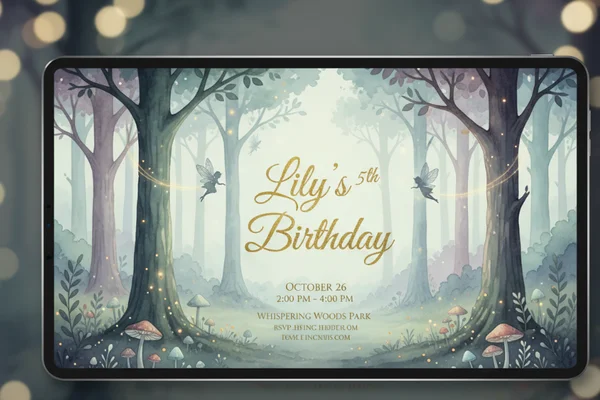
Sarah, a 32-year-old mom, wanted magical invitations for her daughter's fifth birthday. The theme? An "Enchanted Forest" celebration. Sarah spent hours on social media looking at beautiful designs, but she quickly felt overwhelmed. She wanted Lily’s friends to feel the magic from the moment they opened the envelope.
The Pinterest Problem: Why Sarah Felt Overwhelmed
Sarah suffered from "The Pinterest Problem." She saw thousands of perfect, hand-painted invitations online. However, when she tried to use standard templates, they felt generic and boring. She tried to use a basic photo tool she found elsewhere, but the layout was messy and hard to change.
The pressure to create an Instagram-worthy event can be exhausting. Sarah felt like she had to choose between a boring template or spending fifty dollars on a custom digital file. She was stuck between wanting high-quality art and needing something that was actually easy to use.
How Our AI Invitation Maker Simplified the Process
One evening, Sarah discovered our AI invitation designer. Unlike other tools that force you to drag and drop tiny elements for hours, this tool used AI. She realized she didn't need to be an artist; she just needed to describe what she wanted.
The platform allowed her to input basic details like the date and location. Then, you'll see your custom design appear as the AI takes over the creative heavy lifting. By using this free invitation creator, she could generate multiple unique concepts in seconds. It was the first time she felt like technology was working for her.
Step-by-Step: How Sarah Created Her Daughter's Dream Invitation
Sarah’s process was incredibly simple. She finished the whole project during her lunch break. Here is how she did it:
- Enter the Basics: She typed in "Lily’s 5th Birthday," the date, and the "Secret Garden Cafe" address.
- Describe the Vision: In the prompt box, she wrote: "A magical enchanted forest with soft watercolor trees, tiny gold fairies, and elegant script font."
- Generate Options: She clicked the button and the tool created four distinct versions.
- Pick and Refine: She chose the one with the best fairy placement and adjusted the theme colors to a soft lavender.
- Download and Share: She downloaded the high-resolution file and sent it to her local print shop.
The result was a professional-looking invitation that guests assumed cost a lot of money. Sarah felt proud and relieved, knowing she had more time to focus on the party decorations.
Nonprofit Success: How Mark Created High-Impact Fundraiser Invitations
Mark is a retired teacher who volunteers for a local animal shelter. He was put in charge of the "Paws and Prints" annual gala. The goal was to raise $10,000, but the shelter had almost no budget for marketing. Mark knew that to attract wealthy donors, the event needed to look professional and trustworthy.
The Challenge: Looking Professional Without Big Budgets
Mark was worried that a low-quality invitation would make the charity look disorganized. He knew a custom digital invitation builder was necessary, but he was afraid the results would look like a child’s birthday party rather than a formal gala.
"We need to look like a serious organization," Mark told his team. He tried several "free invitation maker" websites, but most of them had huge watermarks or very limited styles. He needed a tool that provided high-definition results without the high price tag.
Maintaining Brand Identity: How Mark Customized His Invites
Mark used the AI tool to ensure the colors matched the shelter's logo. He chose a "professional" tone from the style settings. He then described a "minimalist and modern design with charcoal grey and teal accents."
The AI understood the need for a corporate yet inviting look. Mark was able to produce invites that featured clean lines and sophisticated typography. He didn't have to worry about font pairing or color theory because the AI followed professional design principles automatically.
The Results: How Better Invites Increased Donor Response
When the invitations were sent out, the response was immediate. People commented on how "high-end" the event felt. Because the invitation looked professional, donors took the event more seriously.
Mark’s gala saw a 20% increase in RSVPs compared to the previous year. He credits this to the first impression made by the invitation. By using an online invitation card maker, Mark saved the shelter hundreds of dollars in design fees, which went directly to helping the animals.
James's Corporate Success: Digital Invitations That Drive Attendance
As a tech company marketing assistant, James faced a urgent challenge: planning VIP product launch invites with just 48 hours’ notice. In the corporate world, speed and brand consistency are everything.
The Corporate Dilemma: Tight Deadlines and Brand Consistency
James didn't have time to wait for the internal design team. They were busy with the product itself. He needed our AI design generator that could handle a sleek, high-tech aesthetic.
"If the invite looks cheap, the product looks cheap," James explained. He needed something that felt "Next-Gen." He also needed a way to produce several variations quickly so his boss could choose the best one.
Leveraging AI for Multiple Design Options Quickly
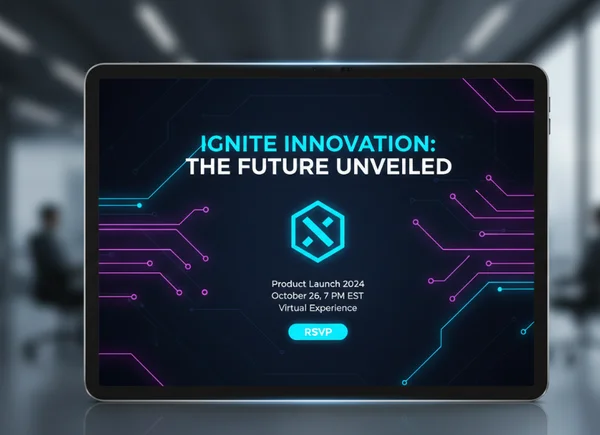
James turned to the AI tools because it was the fastest way to see multiple ideas at once. He entered the product launch details and asked for a "futuristic, dark-themed design with neon blue light effects and bold sans-serif fonts."
In less than ten seconds, the AI presented four different layouts. This is where the power of AI really shines for business users. James didn't have to manually create four files; the tool did it for him. He could compare the designs side-by-side and pick the one that best represented the company's brand.
From Digital Invite to Packed Event: Measuring the Impact
The event was a huge success. James sent the invites as high-quality digital files via email and LinkedIn. The sleek design stood out in the busy inboxes of the influencers.
The attendance rate was 85%, which is very high for a last-minute event. The boss was impressed with James’s initiative and the professional quality of the materials. James now uses the platform for all of his department's internal events and small client mixers.
Your Turn: How to Write an Invitation Success Story with AI
As Sarah's woodland fairy invitations and James' tech-forward designs show, creating beautiful, professional invitations doesn't require design skills or a big budget. You just need the right tools and a clear vision. The right technology can bridge the gap between a great idea and a stunning final product. Whether you are a parent, a volunteer, or a corporate professional, you deserve designs that reflect your hard work.
Our AI invitation maker transforms concepts into reality by combining powerful technology with an intuitive interface. You no longer have to settle for generic templates or expensive designers. Instead, you can use our tools to see your ideas come to life in seconds.
Whether you're planning a birthday party, a nonprofit fundraiser, or a corporate launch, the perfect invitation is just a few clicks away. Stop worrying about pixels and fonts, and start focusing on your celebration. Start designing your custom invitation today and see what the power of AI can do for you.
Frequently Asked Questions About AI Invitation Makers
How much design experience do I need to use an AI invitation maker?
None at all! Our invitation maker is designed specifically for people with zero design background. You don't need to know about "kerning" or "hex codes." Simply describe what you want in plain English, and the AI handles the artistic decisions for you. Think of our AI as your design partner - it crafts original layouts based on your unique vision, not recycled templates.
Can AI really create unique invitations, or will they look generic?
Every design generated by our AI is unique. Unlike traditional template sites that just swap out text on the same background, our AI builds the design based on your specific prompt. If you ask for a "vintage steampunk wedding," the AI will generate elements specifically for that request. To get the best results, use highly descriptive words in your prompt to guide the engine.
How quickly can I create an invitation using an AI invitation maker?
Most users can go from a blank screen to a finished design in under five minutes. The AI generates four different options in about ten seconds. Once you pick your favorite, you can make quick adjustments to the text or colors and download it immediately. It is significantly faster than trying to learn a complicated design program.
What file formats can I download for my AI-generated invitations?
You can download your invitations in high-resolution formats like PNG and PDF. PNG is perfect for sharing on social media, WhatsApp, or email. PDF is the best choice if you plan to print your invitations at home or at a professional print shop. This ensures your e invite maker results look sharp and clear on any screen or paper.